
The Subscription Trap: Why Off-the-Shelf Apps Cost More

When field operations start outgrowing whiteboards and spreadsheets, buying a few low-cost app subscriptions feels like a smart financial move. Paying $30 per user for a dispatch tool, $20 for time tracking, and $15 for mobile forms seems far more sensible than investing upfront in dedicated software. However, mid-sized companies quickly discover that these off-the-shelf apps hide massive operational costs behind their low monthly fees.
In this article, we examine the true cost of software sprawl, why cheap subscriptions slow down growing companies, and how evaluating your entire workflow leads to sustainable business growth.
The Hidden Math Behind Low-Cost Software Subscriptions

Off-the-shelf app subscriptions seem inexpensive on paper, but their true cost comes from the labor required to connect them. When software tools cannot communicate with one another, your office staff ends up manually bridging the gap.
The actual expense of cheap software shows up in three distinct areas:
- Duplicate Data Entry: An office administrator might spend 10 to 15 hours every week re-keying field ticket information from a mobile form app into QuickBooks or an accounting ledger.
- Delayed Cash Flow: When paper tickets or disconnected field apps require manual review and re-entry, billing gets delayed by days or weeks.
- Invoicing Errors: Manual copy-and-paste processes inevitably introduce typos, leading to disputed invoices, delayed payments, and extra back-and-forth with clients.
When you add up the hourly wage of back-office staff doing double work and the interest lost on delayed billing, a $200 monthly software bill easily becomes a $3,000 monthly operational leak.
Why Disconnected Apps Fail the PDSA Process
To fix operational bottlenecks permanently, companies need to look beyond quick patches and study the root cause of their delays. In the Plan–Do–Study–Act (PDSA) framework, treating a symptom with a standalone app creates new problems down the line.
When you buy a software tool to fix a single issue—like digital signatures or dispatch board visibility—without evaluating the full process, you create isolated islands of data.
- The Field View: Operators have to open three different apps on a tablet to check their schedule, complete a daily safety checklist, and log their working hours.
- The Office View: Dispatchers sit between multiple browser tabs, constantly copying customer details, job addresses, and equipment requirements from one system to another.
Rather than simplifying the job, adding disconnected apps adds administrative friction for both field crews and office staff.
Consolidating Workflows into a Unified System
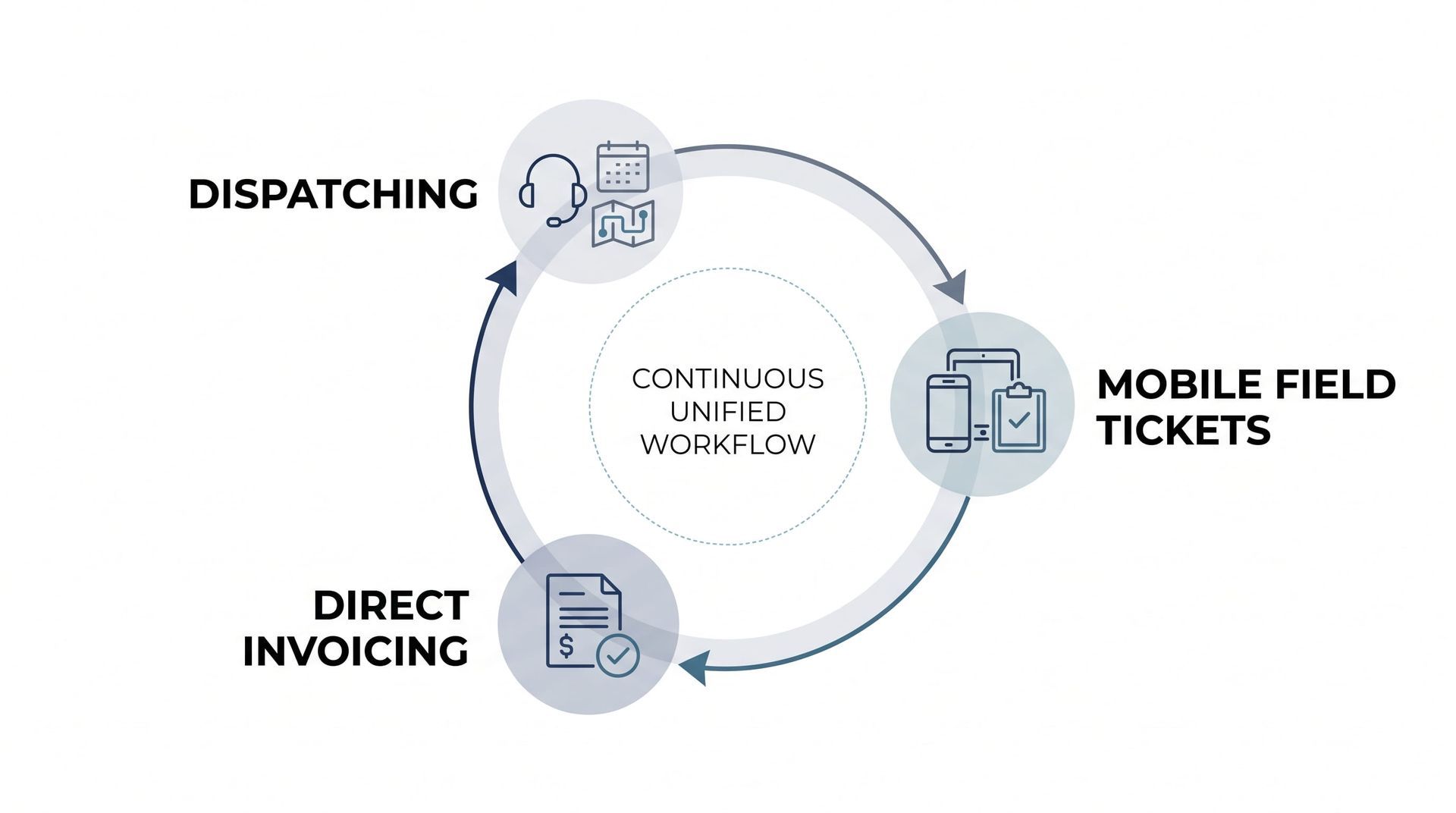
The goal of operational software is to capture data once at the point of origin and let it flow naturally through every stage of the business. Moving to a unified system removes the manual work that holds back mid-sized field service, crane, and rigging companies.
When your dispatching, field ticketing, safety forms, and billing sync within a single foundation, your process improves immediately:
- Single-Point Data Capture: The dispatcher creates the job, automatically populating site addresses, safety requirements, and equipment details for the field crew.
- Instant Field Sign-Off:
The operator completes the work and collects a digital signature on-site, which immediately updates the job status in the back office.
- Automatic Billing Creation: The completed field ticket turns into an accurate draft invoice without anyone in the back office retyping a single number.
Cheap software subscriptions look attractive on a balance sheet, but the hidden labor costs and billing delays they cause can quietly drain thousands of dollars from your bottom line. Investing upfront in a flexible, unified system eliminates duplicate data entry, speeds up cash flow, and gives your team the freedom to focus on serving clients.
If your office staff spends more time copying data between screens than managing operations, it is time to look at the big picture. Contact the team at Lift Office today to discuss your operational workflow and see how unified software can support your long-term growth.
Frequently Asked Questions
Why do cheap software subscriptions end up costing more?
Off-the-shelf software tools often lack native connections to other platforms, forcing office staff to manually copy and paste data between screens. The labor cost of duplicate data entry and the cash flow delays caused by billing errors usually outweigh the initial savings of a cheap monthly subscription.
How does duplicate data entry affect field service profitability?
Duplicate data entry slows down the invoicing process, causing significant delays between when work is completed in the field and when invoices are sent to clients. It also increases the likelihood of human error, which leads to disputed bills, administrative rework, and lost revenue.
What is the difference between treating operational symptoms and fixing root causes?
Treating a symptom means buying a standalone app to fix a isolated problem, like paper forms, without considering how that data moves through the rest of the business. Fixing the root cause involves reviewing the entire operational workflow—from initial dispatch to final billing—and using software that connects every step.
Ready to Simplify Your Dispatch Desk?
We help mid-sized contractors ditch fragile spreadsheets and build a dispatch workflow that protects your team and scales with your fleet.
Recent Posts